# All about Rhino

## Finch Layers in Rhino

#### Layer Structure

When you load a Finch project in Rhino, the layer structure for exchanging geometry is automatically imported as well. Make sure to place your geometry on the right layers for Finch to recognize and import everything correctly.

{% hint style="warning" %} <kbd>**Finch**</kbd> acts as the **parent layer** and should be left empty.
{% endhint %}

Below is an overview of the layer structure used:

<table><thead><tr><th width="201.1717529296875">Layer name</th><th>Description</th></tr></thead><tbody><tr><td><strong>building mass</strong></td><td>Stores <strong>closed</strong> building masses (mesh, polysrf, extrusion, brep)</td></tr><tr><td>centerline</td><td>Stores lines which controls the placement of generated corridors.</td></tr><tr><td>grid lines</td><td>Stores multiple <strong>open polylines</strong> that affect the Custom Core algorithm</td></tr><tr><td><strong>building interior block</strong></td><td>Interior parent layer, empty</td></tr><tr><td>programs</td><td>Stores interior program data / geometry</td></tr><tr><td>structure</td><td>Stores interior structural data / geometry</td></tr><tr><td><strong>custom geometry</strong></td><td>Stores custom geometry in sub-layers used for <a href="/pages/RZYAyjw9cFDUuY991lo0">context</a></td></tr></tbody></table>

{% hint style="info" %}
**Overwriting Layer Geometry**

When a different Finch variant is loaded into Rhino, the previous geometry in the Finch layers is overwritten and replaced with the new geometry. The sync does not affect any geometry outside of the **`Finch`** parent layer.
{% endhint %}

## Building Location

{% hint style="info" %}
Try to keep your building within **1 kilometer** of the Rhino origin point. Use the Rhino command **`What`** to find the xyz coordinates of your geometry.
{% endhint %}

## Updating the plug-in

{% hint style="info" %}
**Issues with updating the plug-in?**

Rhino package manager has issues with updating plug-ins. If your plug-in version hasn't updated after restarting Rhino try the following:

* Uninstall the Finch Plug-in
* Restart Rhino
* Install the newest version of the Finch plug-in
* Restart Rhino

The update notification can be toggled on/off under the advanced tab of the plug-in.
{% endhint %}

## Plug-in settings

#### Auto-receive changes

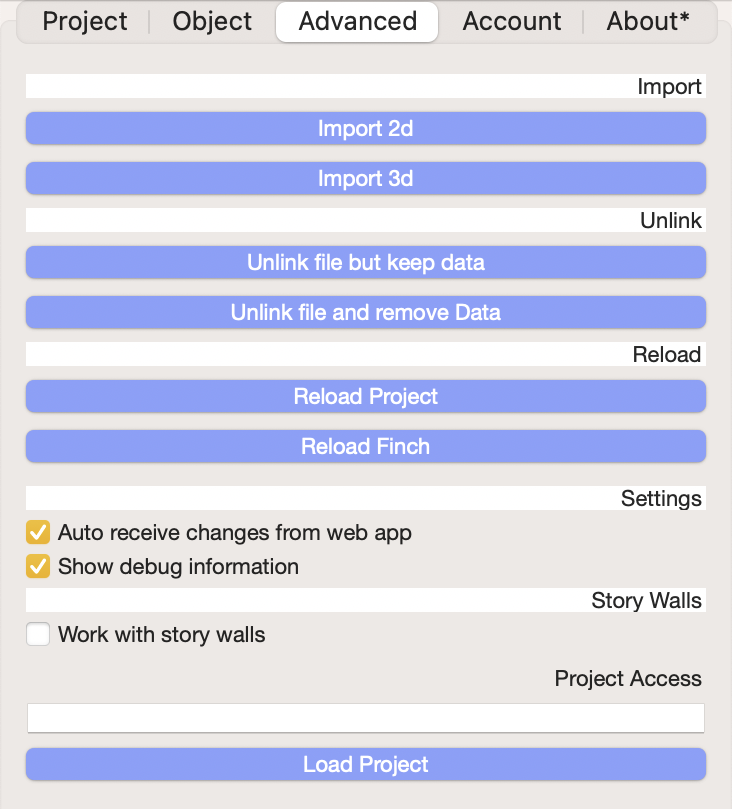
If **`Auto receive changes from web app`** is checked, any updates made in Finch will be automatically synced to Rhino. If it is not checked, after working in the web app the Rhino file will need to be synced before making any further edits in Rhino. Otherwise, the Finch and Rhino versions of the project will contain different data and the user will be prompted to choose which version to override when syncing new changes.

<figure><img src="/files/iWKJSxF5qsrrbr0hQxtz" alt=""><figcaption></figcaption></figure>

## Centerline Positioning

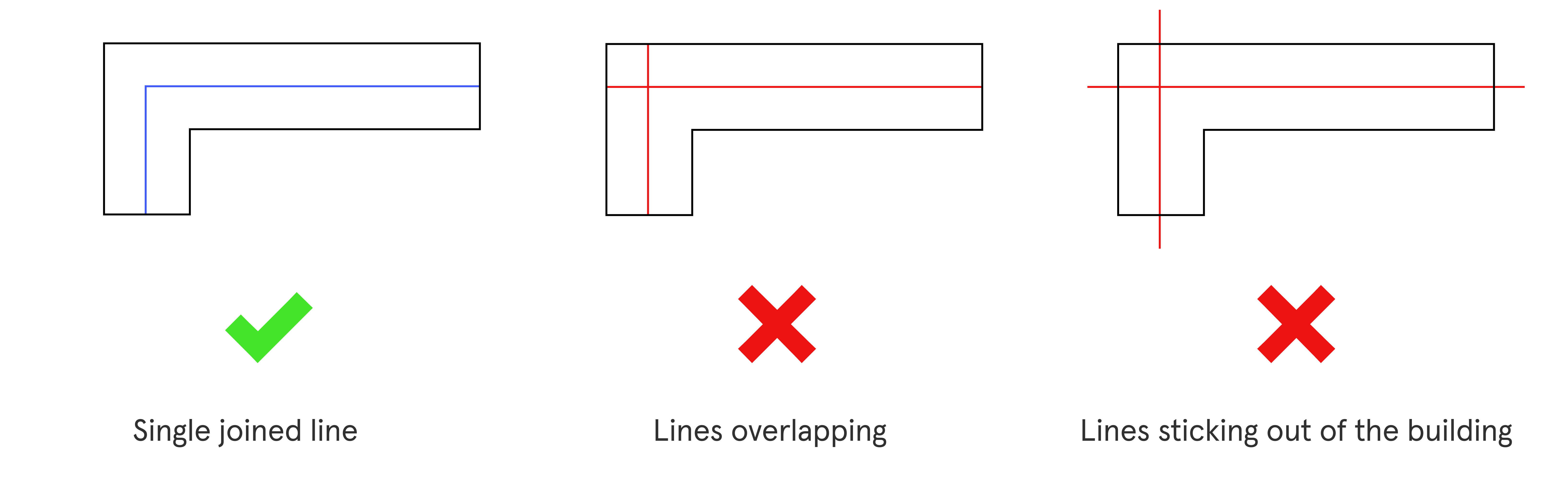
If you are uploading or adding a centerline, be sure that it is one joined line that does not intersect itself or stick outside of the building.

<figure><img src="/files/YvN5IrdK0uGSCRbznlka" alt=""><figcaption></figcaption></figure>

## Override geometry check

{% hint style="info" %}
If you are having trouble downloading geometry from finch to rhino containing invalid geometry, try holding down Ctrl while pressing **`Sync`** to override the geometry check.
{% endhint %}

***


---

# Agent Instructions: Querying This Documentation

If you need additional information that is not directly available in this page, you can query the documentation dynamically by asking a question.

Perform an HTTP GET request on the current page URL with the `ask` query parameter:

```
GET https://docs.finch3d.com/docs/first-steps/rhino/all-about-rhino.md?ask=<question>
```

The question should be specific, self-contained, and written in natural language.
The response will contain a direct answer to the question and relevant excerpts and sources from the documentation.

Use this mechanism when the answer is not explicitly present in the current page, you need clarification or additional context, or you want to retrieve related documentation sections.